How to Choose Remote Wipe Software: 8 Questions to Ask
How to choose remote wipe software for an ITAD floor or IT team: the two kinds, what each proves, and eight questions to ask any vendor.
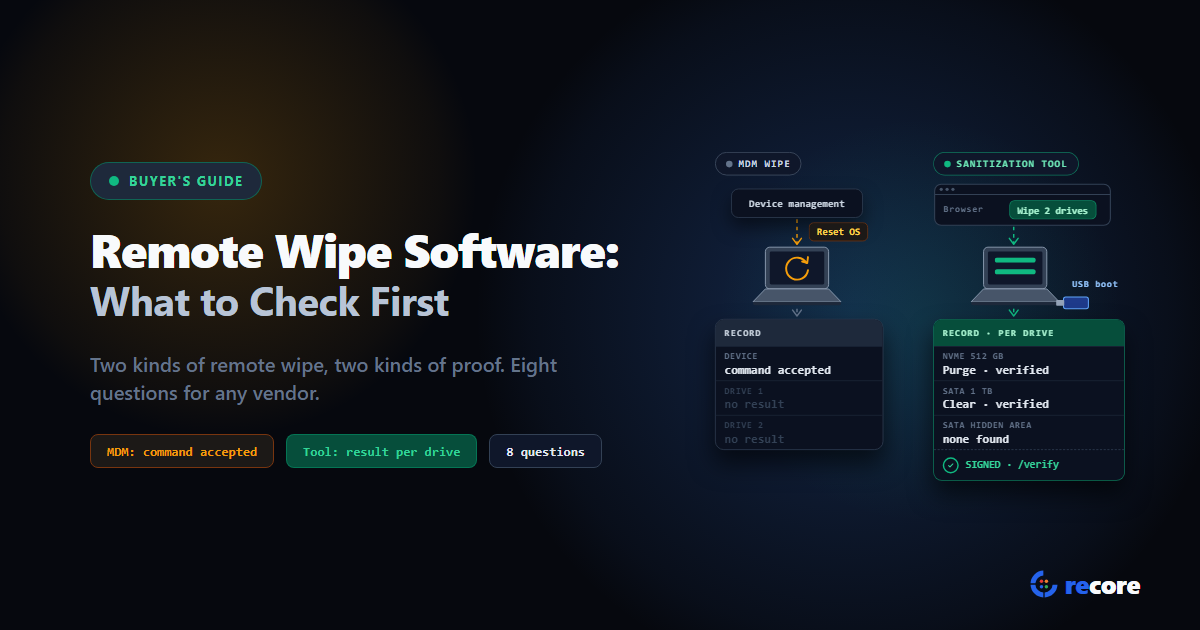
Two tools can both be sold as remote wipe software and hand you very different proof. One tells you a laptop accepted a reset. The other tells you what happened to each drive.
Remote wipe software is any tool that lets you erase a computer without standing next to it. You'll also see it called remote device wipe, remote data erasure or remote data deletion. The first step is knowing which kind a vendor is selling you. After that, eight questions sort the good offers from the rest.
This guide is for ITAD floors and IT teams comparing tools. For what remote wipe means in general, see remote data wipe.
- Device management (MDM) wipes reset the operating system. Their record says the device took the command.
- Sanitization tools boot on the machine and erase each drive. Their record should say what happened to each one.
- Pick the kind by the proof you need, then ask the eight questions in section 3.
1. Remote device wipe vs remote data erasure
The first kind is a device management wipe. Your MDM tool (mobile device management, the console that manages your fleet) sends a command to an agent already running on the device. The device's own operating system then resets itself. Microsoft's Intune page says "Use the Wipe action in Intune to factory reset a device, restoring it to its default settings."
The second kind is a sanitization tool started remotely. Someone boots the machine from a USB stick or the network into the tool's own small operating system. Someone elsewhere picks the drives in a dashboard and starts the wipe. The tool talks to each drive directly, so it can use the drive's built-in erase commands.
| Device management wipe | Sanitization tool, started remotely | |
|---|---|---|
| What runs the wipe | The device's own operating system | A separate OS booted on the machine |
| Works on a device in someone's bag | Yes, if it's on and online | No, someone has to boot it |
| What gets erased | What the reset touches | Each drive the tool can see |
| What the record says | The device accepted the command | A result per drive |
An MDM wipe is how you protect a laptop that is lost, stolen or still with a leaver. A sanitization tool is how you prove what happened to each drive once a machine is leaving your control for good. Our Intune and NIST 800-88 guide goes through what the Windows reset does at the drive, and the offboarding guide shows how the two fit together when someone leaves.
2. Start with the proof you need
NIST SP 800-88 Rev. 2 is the US government's guide to erasing storage. It names three methods. Clear works through the drive's normal interface, "for protection against simple, non-invasive data recovery techniques." Purge makes "target data recovery infeasible using state-of-the-art laboratory techniques." Destroy is physical.
So decide which machines need Clear, which need Purge, and who will read the record. A laptop going to the next hire inside your company may only need a reset and an asset record. A pallet going to a buyer is leaving your control, and NIST says "When possible, the purge sanitization method should be used instead of the clear sanitization method." It will also need a certificate for each drive.
3. Eight questions to ask any vendor
Does it erase every drive, including the parts the OS can't see?
A drive can hold more than the operating system sees. NIST gives the example of a drive with "1024 GB of total physical capacity but only 900 GB of available capacity," and says "user data may be stored on the full 1024 GB" and "the entire contents should be sanitized."
No tool can reach that spare area through the drive's normal reads and writes. Only the drive's own sanitize commands are meant to reach it, so ask which commands the tool uses on each kind of drive.
A reset run by Windows works at the level of volumes. Microsoft's reset documentation says that with more than one volume, "users can choose to remove data from all volumes or only the Windows volume," and it tells manufacturers how to set up utility partitions "to ensure these partitions are not affected by the reset process."
Ask the vendor how it finds every physical drive, including ones behind a RAID controller. On SATA drives, ask whether it checks for a host protected area (HPA) or device configuration overlay (DCO), two settings that hide part of the drive from the operating system. And ask what the certificate says when it finds one.
Does it check each drive and say Clear or Purge?
NIST says Clear and logical Purge "can be verified by checking the completion status of the tools and identifying errors, anomalies, and the health of the ISM" (ISM is NIST's word for a storage device). Its appendix on drive commands also warns that "the command name might imply a certain capability but not actually meet minimum requirements for the sanitization method."
So ask to see one drive's record. It should name the method, whether the drive reported success, and the check done afterwards.
Is there one certificate per drive that someone else can check?
NIST Section 4.6 says "a certificate of sanitization (see Appendix C) should be completed for each ISM that has been sanitized, per the organization's policies." Each ISM means each drive. A laptop with two drives needs two certificates.
Your client, an auditor or a buyer will want to confirm a certificate is genuine without calling you. Ask whether certificates are signed, and how an outsider checks one.
What happens if the machine is offline or the connection drops?
Any remote wipe needs the machine on and reachable when it starts. For a default Windows wipe, Microsoft says "If the wipe is interrupted, the device attempts to roll back to its previous state. If rollback fails, the device may become unusable and require a full Windows reinstallation."
For a sanitization tool, ask where the wipe actually runs. If it runs on the machine, a dropped connection shouldn't stop it, but the result has to be held and sent later. Also ask whether a wipe for a machine that isn't connected is refused, so nobody thinks it started.
Can it wipe the drive it runs from?
A tool can't safely overwrite the drive it's running from. An MDM wipe gets around this by rebuilding Windows in place on that drive, which is why it's a reset. A sanitization tool booted from a USB stick can erase every internal drive, because it runs from the stick.
The risk is a wipe that picks the wrong drive, such as the stick itself. Ask how the tool decides which drive it's running from, and what it does if it can't tell.
Who can start a wipe?
In Intune, you need a role such as "Help Desk Operator" or a custom role with "The permission Remote tasks/Wipe," and an access policy can mean "a second administrator must approve the action before it can proceed."
Ask any vendor which roles can start a wipe, whether view-only users are blocked, and whether the log shows who started each one.
Can it handle many machines at once?
An ITAD floor wipes whole batches, and even MDM has limits. Microsoft says "A tenant can submit up to 500 Wipe actions per day."
Ask how you select drives across many machines in one go. Network boot (PXE) saves walking round with sticks, but needs a boot server on your network, so ask who sets that up.
How is it priced?
Prices are quoted per drive, per machine, per seat or licence, or as a subscription, sometimes with a separate console or network edition for remote use. Price one real batch under each offer, with some two-drive machines and a few failed wipes. Ask what a re-wipe costs, and whether a remote wipe costs more.
The eight questions on one page
| Question | A good answer | A red flag |
|---|---|---|
| Every drive, and hidden areas? | Finds each physical drive; checks hidden areas and says what it found on the certificate | "We wipe the disk" |
| Checked, and Clear or Purge? | Method, status and the check, per drive; says Clear when Purge wasn't possible | Every drive labelled Purge |
| A certificate per drive others can check? | Signed, with a way to check it without an account | One PDF per batch |
| Connection drops? | The wipe runs on the machine; the result is held and sent later; offline machines are refused | "It needs a stable connection" |
| Its own boot drive? | Hides it and refuses it, and refuses every wipe if it can't tell | No answer |
| Who can start one? | Named roles, view-only blocked, a log of who started each wipe | Anyone with a login |
| Many machines? | Pick drives across machines at once; clear boot options | One machine per session |
| Price? | One price per drive, remote or local | A separate console or network edition |
4. Where reCore fits
reCore is the second kind. It doesn't replace your MDM for a laptop still out with someone.
- A machine boots the reCore OS from a USB stick, or from the network with PXE boot we set up on request. It connects to your dashboard once someone signs in on it.
- From the dashboard you pick one drive, or drives across several connected machines, and confirm. Technicians and admins can start a wipe. View-only users can't.
- The server refuses to send a wipe to a machine that isn't connected. Once started, the wipe runs on the machine and keeps going if the connection drops. The record is sent when the machine is back online.
- reCore never wipes the drive it's running from. It keeps that drive off the list, refuses a wipe aimed at it, and refuses every wipe if it can't tell which drive that is.
- Booted from reCore, it uses the drive's own erase commands where the drive has them, and checks each drive afterwards. It also checks SATA drives for a hidden area (HPA or DCO) before the wipe, and the certificate says what it found: none, a hidden area and whether the wipe covered it, or that it couldn't tell. When reCore runs inside Windows instead, only overwrites and ATA Secure Erase run there, so most of those wipes are recorded as Clear.
- Every drive gets its own certificate, digitally signed, which anyone can check at recore.replugit.com/verify without an account.
- Remote wipe is in every plan, at the same per-drive credit as a wipe started at the machine. The remote wipe feature page has the details.
Want to run these eight questions against reCore for your own floor? Email [email protected].
Sources
- NIST, SP 800-88 Rev. 2, Guidelines for Media Sanitization, September 2025: Sections 2.3, 3.1.1, 3.1.2, 4.5.1, 4.6, Appendix B and the glossary entries for Clear and Purge.
- Microsoft Learn, Wipe devices with Microsoft Intune, read 23 November 2026.
- Microsoft Learn, How push-button reset features work, "Remove everything", read 23 November 2026.
Frequently asked questions
What should I look for in remote wipe software?
Start with what you need to prove afterwards. Then ask eight things: does it erase every drive and the areas the operating system can't see, does it check each drive and say Clear or Purge, is there a certificate per drive that someone else can check, what happens if the machine goes offline, can it wipe the drive it runs from, who can start a wipe, how does it handle many machines at once, and how is it priced.
Can remote wipe software erase hidden areas of a drive?
It depends on how it reaches the drive. A reset run by the operating system works on the volumes Windows can see, and Microsoft tells manufacturers how to keep their utility partitions out of it. A sanitization tool that talks to the drive directly can use the drive's own sanitize commands, which NIST says can address all storage areas more effectively, and can look for areas a SATA drive hides from the operating system. Ask the vendor what the certificate says when it finds one.
What happens if the connection drops during a remote wipe?
Ask where the wipe runs. If it runs on the machine itself, it can finish without the network, and the result has to be held and sent later. Microsoft says a default Windows wipe from Intune that gets interrupted tries to roll back, and if that fails the device may need Windows reinstalled. Ask each vendor what its record shows in both cases.
Who should be allowed to start a remote wipe?
Only people whose job it is, through a named role, with a log of who started each wipe. Microsoft's Intune, for example, needs a role with the Remote tasks/Wipe permission and can require a second administrator to approve. Ask any vendor which roles can start a wipe, whether a view-only user is blocked, and whether the log shows who started it.
How is remote wipe software priced?
Common models are per drive, per machine, per seat or licence, or a subscription with a separate console or network edition for remote use. Work out the cost for one real batch, including re-wipes after a failure and machines with two drives, and ask whether a wipe started remotely costs more than one started at the machine.
reCore Research Lab
OfficialCompliance & Security Group
Technical research group specializing in NIST SP 800-88, IEEE 2883, SERI R2v3 standards, and forensic data recovery testing.
Wipe every drive. Prove every wipe.
reCore picks the purge method for each drive, verifies the result, and issues a per-drive certificate that a second person approves.
Related Guides & Research
Continue exploring compliance standards, firmware sanitization, and hardware diagnostics.
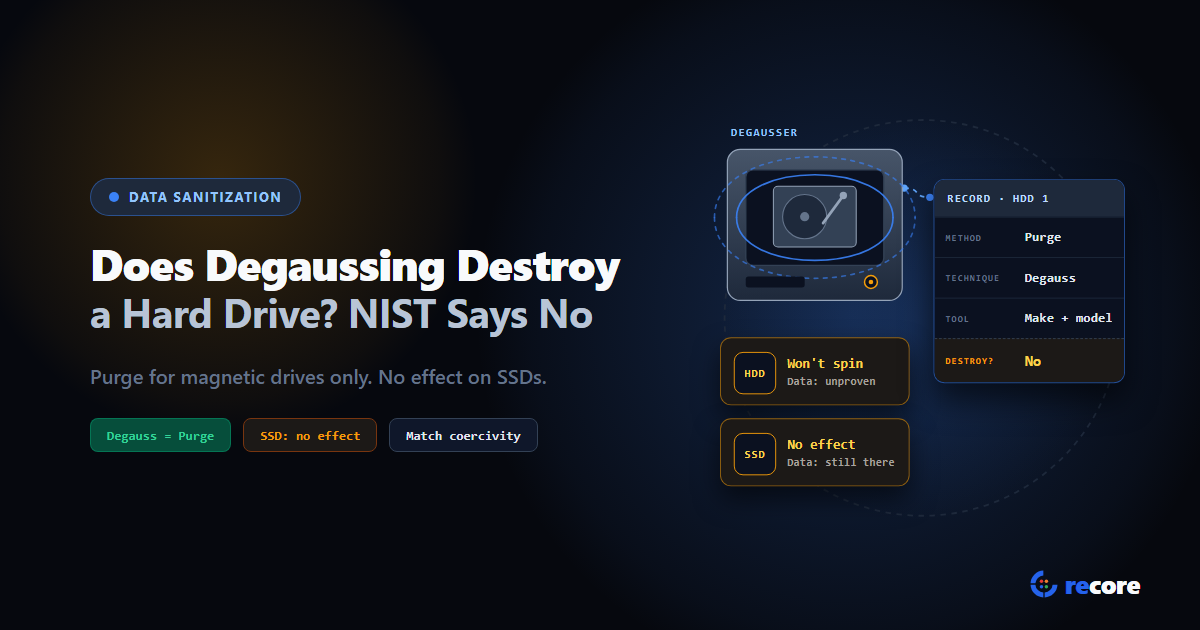
Does Degaussing Destroy a Hard Drive? What NIST SP 800-88 Rev. 2 Says
Under NIST SP 800-88 Rev. 2, degaussing is a Purge for magnetic drives only. Why it does nothing to SSDs, when a degausser is too weak, and what to record.
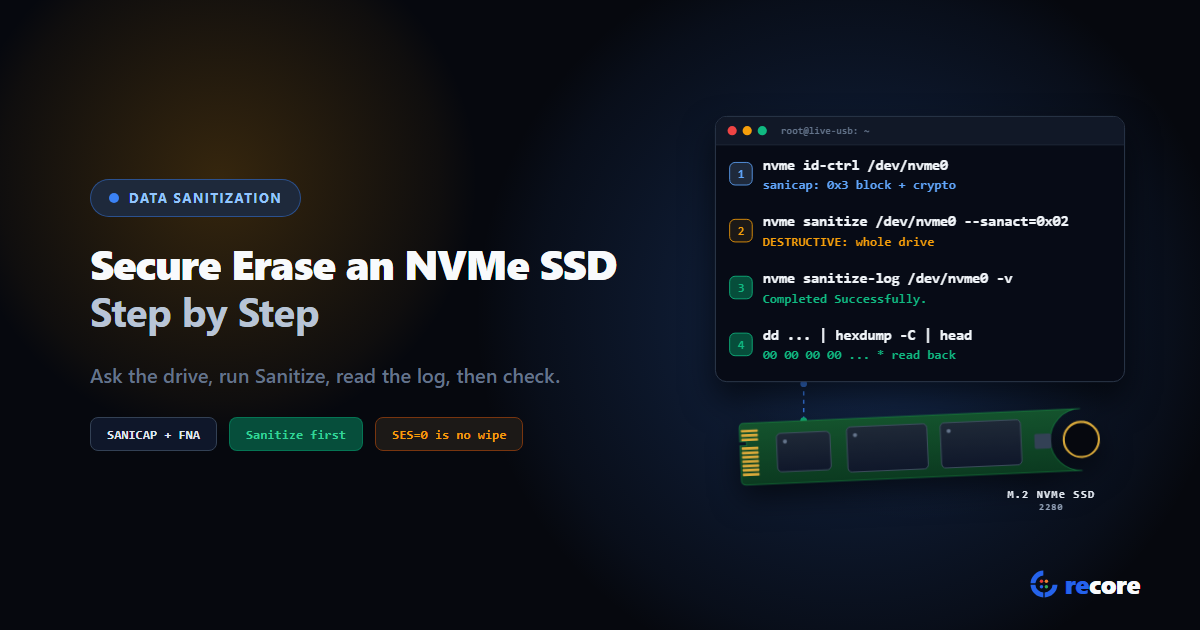
How to Secure Erase an NVMe SSD, Step by Step
The nvme-cli commands in order: check what the drive supports, run Sanitize or Format, watch it finish, check the result, and keep a record for each drive.
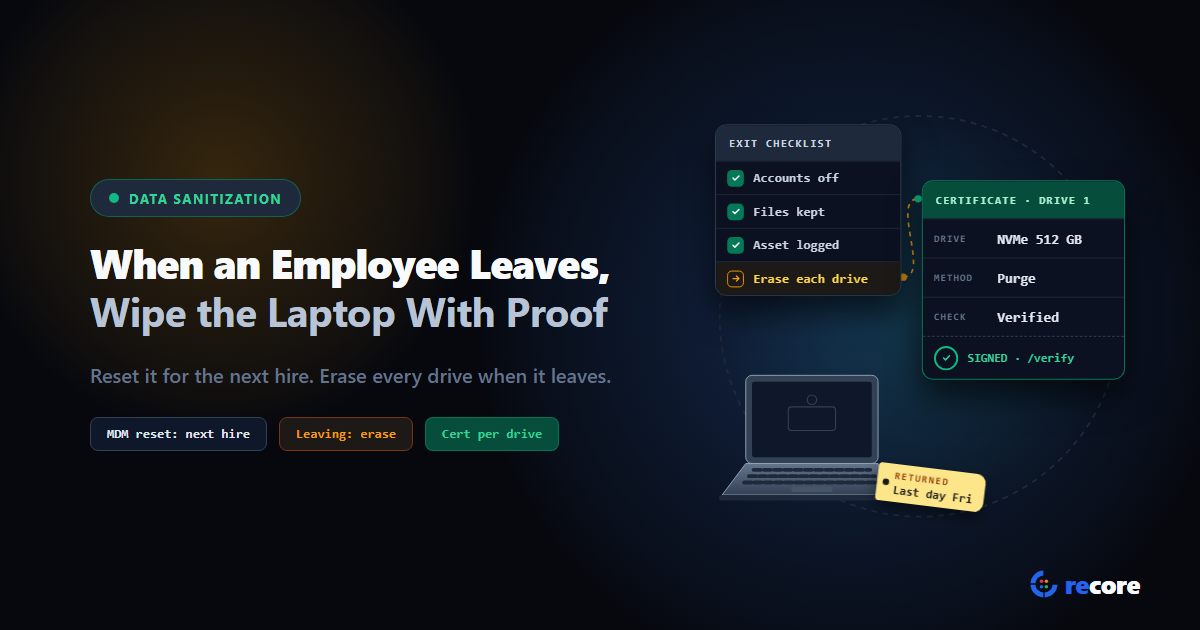
How to Wipe a Laptop When an Employee Leaves, With Proof
Reset it for the next hire, or erase every drive with a certificate if it leaves the company. What an MDM wipe proves, and an offboarding checklist.
Stay Ahead in Data Sanitization & ITAD Compliance
Join enterprise IT managers and electronics refurbishers receiving our monthly technical standards breakdowns, NIST/R2v3 audit tips, and benchmark releases.