Laptop Battery Fires: A Simple Intake Check for Small ITAD Floors
Battery fires keep hitting recycling sites. A simple intake check for laptops: look for swelling, read battery health, set risky packs apart, record it.
A monthly fire report covered by Resource Recycling counted 32 publicly reported fires at facilities in the US and Canada in September alone. Not all were battery fires, but the article says vapes and other battery-embedded devices "remain a primary cause of fires when they end up in waste streams." And those are only the big ones, generally two alarms or more. "Actual incident totals are estimated to be six times higher."
Laptops are part of this. When the US EPA studied battery fires at waste sites, the most common batteries it could name as the cause were "cell phone batteries, followed by tablet and laptop batteries."
You may not run a shredder. But if you run an ITAD or refurbishment floor, you fill cages and scrap boxes with laptops, and the ones that don't sell go downstream to someone who does shred. The cheapest moment to catch a dangerous pack is when you open the box, before anyone charges, tests, stacks or ships the laptop. Below is the routine we'd use, with what the safety guidance says and where it stops.
- Battery fires at recycling sites are down a little this year, from record highs. Devices with batteries built in are still a primary cause.
- Look at every laptop before you power it. A swollen pack shows in the case, and only a person can see it.
- Battery health and cycle count tell you how worn a pack is. They don't tell you whether it's safe.
- Set damaged packs apart, store and ship them the way the guidance and your downstream recycler say, and write down what you found.
1. What the fire numbers say
The monthly counts come from fire-prevention consultant Ryan Fogelman's reports, as covered by Resource Recycling. We've added the EPA's older study for scale.
| What | Figure | Source |
|---|---|---|
| Facility fires, September 2026, US and Canada | 32, down from 45 a year earlier | Resource Recycling, Oct 23, 2026 |
| Year to date, end of September | 326, against 345 at the same point in 2025 | Same |
| Full-year records | 430 in 2024, then 448 in 2025 | Same |
| Waste facility fires caused or likely caused by lithium batteries, 2013 to 2020 | 245 fires at 64 facilities | US EPA, 2021 |
Two caveats before you lean on any of this. The monthly report sorts fires by what each site processes, "not the confirmed cause of the fire," so not every fire in it is a battery fire. And the EPA says the cases it found were the ones "relatively easy to find," with "likely to be a significant number of additional relevant cases" it missed.
Fogelman is cautious about the dip. "But I am not ready to celebrate a victory over this problem," he wrote in October. In June: "The industry has settled into a new, elevated baseline."
2. Why intake is the right place
At electronics recyclers, the EPA says, "the battery is typically removed from devices prior to processing" for safety reasons. Laptops make that hard. Their batteries are often "encased in plastic or glued into devices, making them very difficult or even impossible to remove intact."
So a bad pack can travel a long way inside its laptop: intake bench, test bench, storage cage, scrap box, truck. Each handoff after intake tends to assume someone earlier already checked it. We'd rather you spend a careful look on day one than find out on the truck.
3. Look before you power it
Start with your eyes and hands. The battery-management guide written for recycling facilities by three industry associations (NWRA, ReMA and SWANA) lists what a damaged lithium-ion battery may look like: swollen, corroded, leaking or smoking; burn marks; exposed or damaged wires; a cracked or opened casing; a misshapen structure; or a "cherry gum smell."
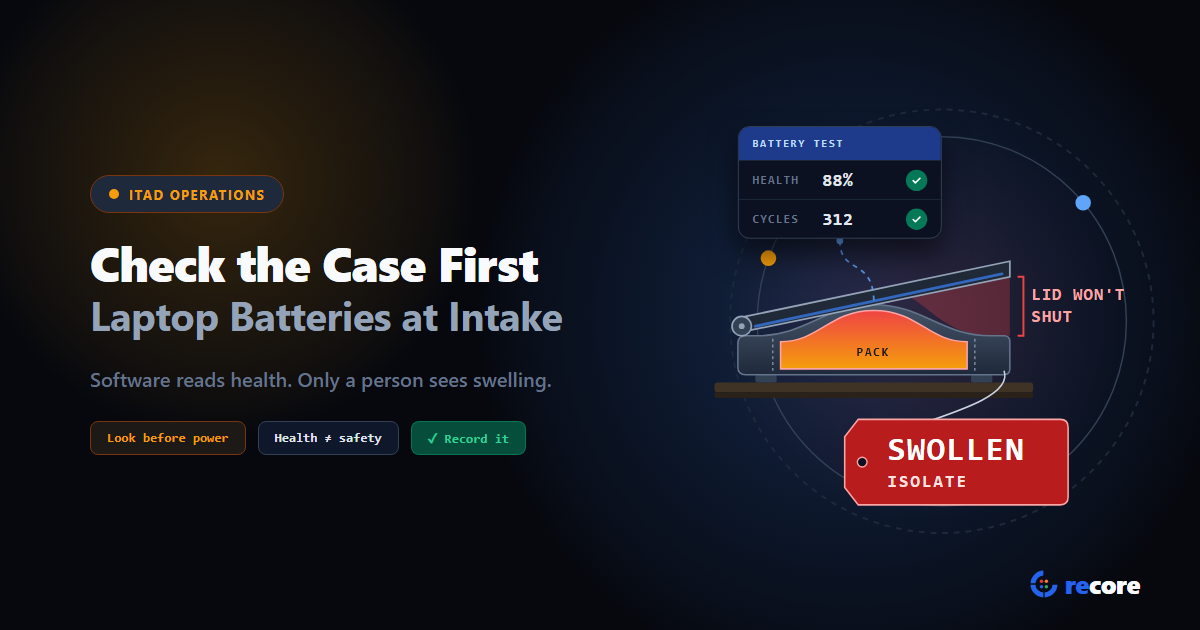
You won't usually see a laptop's pack. It sits in the base, under the keyboard deck and trackpad, and when it swells it pushes on whatever is next to it. So check the case:
- Does the lid close flat, or spring open at the front?
- Is the trackpad raised, or does its click feel stiff or dead?
- Does the bottom cover bow out, or has a seam opened?
- Does the laptop rock on a flat bench?
No software sees any of this. Someone has to pick the laptop up, turn it over and look.
If you find swelling, don't power it and don't put it on a charger. The University of Reading's fire safety guidance puts it plainly: "Even if your device still works, if the battery is swollen, the battery must be replaced immediately, using the device or leaving it connected to power can be dangerous." Never press on the bulge or try to open it either, because "Puncturing a swollen lithium-ion battery may lead to fire and explosion."
A battery that's getting hot, venting or smoking isn't an intake decision. Follow your site's fire plan. The industry guide reminds US facilities that a written fire prevention and response plan is required by OSHA 29 CFR 1910.39.
4. Read the battery on the laptops that boot
Laptops that pass the look go on to testing, where the battery gets read. Health is what the pack holds today divided by what it held new. Cycle count is how many full charge and discharge cycles it has done. Our post on checking laptop battery health in bulk covers how to read both on Windows and Linux.
These numbers get misread both ways. A battery at 55% health is worn. It lowers the grade and the price, but that number says nothing about safety either way. And a pack reading 88% can still be swollen. Reading lists the usual causes of swelling as overcharging, manufacturing defects, deep discharge and damage, and a health percentage measures none of them.
So the software check sorts batteries for grading and sale, and the look sorts them for safety. You need both. Do the look first.
5. Decide, set apart, store
Make the call at intake, for every laptop, and write it down. Here's the simple version we'd start with:
- Looks fine and boots: it carries on through the normal flow.
- Looks fine, heading for scrap: ask your downstream recycler whether they want the battery out first. If they do, remove only packs that come out without force. If it won't come out, keep the laptop whole and ask how they take devices with built-in batteries.
- Swollen or damaged: set it apart now. No charger, no test, no scrap box.
The industry guide's first rule for damaged batteries is that they "should not be stored with other undamaged batteries." It asks you to treat any battery that is "swelling, smoking, leaking, or overheating" with "extreme caution" and to "Immediately place them in an absorbent, non-flammable material in a cool, dry, well-ventilated area." For where that area should be, it gives two lines, in this order: "Store outdoors away from structures, vehicles, and equipment." and "Store in a noncombustible structure."
Loose batteries in general need their terminals covered, because the guide says they "must be protected or isolated to avoid sparks or heat from a residual charge." In practice that's clear tape over the positive terminal, or each battery in its own clear, sealable bag. Once they're taped or bagged, they can go in "a UN Rated drum (1A) with an anti-static liner or a five-gallon pail with lid," kept cool and dry. The EPA gives consumers similar advice: tape the terminals, bag each battery or device separately, or both. And don't trust a pack that seems flat. The EPA warns a battery can hold "a significant charge" yet "appear to the user to be completely discharged."
That guide was written for materials recovery facilities, not ITAD benches, and that local rules differ. We'd treat it as a starting point, then walk your set-up past your local fire authority.
6. Ship it right and write it down
You can't just box them up and send them. In the US, lithium batteries fall under the hazardous materials rules in 49 CFR Parts 171 to 180, with lithium battery requirements in section 173.185. The EPA notes that damaged, defective or recalled (DDR) batteries are "more likely to catch fire during transportation than non-DDR lithium batteries." It also recommends that businesses "consider managing Li-ion batteries under the federal 'universal waste' regulations" in 40 CFR part 273. Outside the US, ask your own regulator. Everywhere, ask your downstream recycler how they want damaged packs packed before you send any.
Then write it down, using the record line under the checklist below. Count the set-aside units each month too, so you can see which lots or suppliers send you the most trouble.
The intake checklist
| Sign | What it means | What to do |
|---|---|---|
| Lid won't close flat, trackpad raised, case bowed or split | The pack is likely swelling | Don't power or charge. Set apart in non-flammable material, away from other batteries. Record it. |
| Burn marks, leaking, corrosion, cherry gum smell | Damaged pack | Same as above. Never press on or open the pack. |
| Hot, venting or smoking | Possible thermal runaway | Keep away from it and raise the alarm. Then follow your fire plan. |
| Looks fine, boots, health reads well | Normal pack | Test, grade, sell. |
| Looks fine, boots, low health | Worn pack; the visual check covers safety | Grade and price it, or replace the battery. |
| Looks fine, headed for scrap | Normal pack in the wrong stream | Ask your downstream recycler whether they want the battery out first; if so, remove only packs that come out without force, then tape or bag them. |
Record for each set-aside unit: serial, sign seen, checked by, date, storage spot, where it went.
7. Where reCore fits
reCore runs on the laptops that pass your look. Each one boots the reCore OS, and the station runs the battery test with the rest of the diagnostics. It reads health as a percentage (full charge capacity divided by design capacity) and the cycle count where the battery reports one. A battery that reports 0 cycles has the count left out, so a used pack never shows as new. The test also flags a battery that won't charge on a connected charger.
Health and cycle count feed the grade and go onto the stock list for each unit. If a bulge only shows up later, at grading, the default grading list has a battery bulge defect, rated critical, for the technician to mark. Then shut the laptop down and treat it as in section 5.
What reCore doesn't do: it can't see a swollen pack, and it doesn't judge fire risk. The look stays with a person, and the laptops you set aside at intake never reach the station.
Conclusion
Fire counts are down a little this year. The year so far is still above every comparable January-to-September period before 2024, and a small floor can't fix that alone. What you can do is make sure your dangerous laptops don't leave in a scrap box. Look at every case before it gets power. Read the battery on the ones that boot, for grading, not safety. Set damaged packs apart the way the guidance describes, and write down what you found and where it went.
Sources
- Paul Lane, "Facility fires down in September, year to date over 2025," Resource Recycling, October 23, 2026. September, year-to-date and record counts; the six-times estimate; the facility-type caveat; Fogelman's October quote.
- Paul Lane, "Battery fires still a major risk to recyclers: report," Resource Recycling, June 9, 2026. The "elevated baseline" quote.
- David Daoud, "Who should pay for lithium-ion battery fire damage?" Resource Recycling, September 21, 2026. The 49 CFR Parts 171 to 180 reference.
- Scott Snowden, "January fire data drives shift in recycling safety," Resource Recycling, January 6, 2026. Points to the industry guide below.
- NWRA, ReMA and SWANA, Guide for Establishing Lithium-ion Battery Management Practices at Materials Recovery Facilities, 2025. Damaged battery signs, the damaged battery protocol, storage and terminal protection, the fire plan.
- US EPA, An Analysis of Lithium-ion Battery Fires in Waste Management and Recycling, EPA 530-R-21-002, July 2021. The 245 fires at 64 facilities, the battery types, battery removal at electronics recyclers.
- US EPA, Used Lithium-Ion Batteries. Bagging and taping, residual charge, 49 CFR 173.185, transport risk of damaged batteries, universal waste.
- University of Reading Health and Safety Services, "I have a swollen lithium-ion battery what should I do?" Causes of swelling, not using or charging a swollen battery, not puncturing it.
Frequently asked questions
How do I tell if a laptop battery is swollen?
Look at the case before you power it on. A swelling pack pushes on whatever sits above or below it, so check whether the lid closes flat, whether the trackpad sits raised or clicks badly, whether the bottom cover bows out or a seam has opened, and whether the laptop rocks on a flat bench. Software cannot see any of this. A person has to look.
Is a laptop battery with low health dangerous?
Health doesn't tell you either way. It is what the pack holds today compared with new, so a low number means a worn battery that sells for less. It does not mean the pack is swollen or damaged. Swelling comes from things a health number does not measure, such as overcharging, manufacturing defects, deep discharge or damage, so a pack can read well and still be swollen.
Should I charge or test a laptop with a swollen battery?
No. The University of Reading's fire safety guidance says a swollen battery 'must be replaced immediately, using the device or leaving it connected to power can be dangerous.' Set it aside before it reaches a charger or a test bench.
How should a small ITAD floor store damaged lithium-ion batteries?
Apart from undamaged ones. The NWRA, ReMA and SWANA guide for recycling facilities says to place batteries that are swelling, smoking, leaking or overheating in an absorbent, non-flammable material in a cool, dry, well-ventilated area. For where to keep them, it gives two lines: 'Store outdoors away from structures, vehicles, and equipment.' and 'Store in a noncombustible structure.' Check the details with your local fire authority and your downstream recycler.
Can reCore detect a swollen battery?
No. reCore's battery test reads health as a percentage and the cycle count where the battery reports one. It cannot see swelling, and it is not a safety check. The look at the case comes first and is done by a person.
reCore Research Lab
OfficialCompliance & Security Group
Technical research group specializing in NIST SP 800-88, IEEE 2883, SERI R2v3 standards, and forensic data recovery testing.
Run your whole floor from a browser
Boot each machine from a USB stick, then test, wipe and grade it while you watch every station live. Nothing to install on site.
Related Guides & Research
Continue exploring compliance standards, firmware sanitization, and hardware diagnostics.

Wiped Clean, Still Enrolled: Why a Wipe Doesn't Free a Managed Laptop
A wipe erases the drive, not the device's registration with its old company. What Microsoft and Google say happens after a reset, who can release a device, and what to ask for before pickup.
What Is ITAD? The IT Asset Disposition Process, Step by Step
ITAD means IT asset disposition: what happens to old laptops and servers after use. The seven steps a device goes through, from pickup to paperwork.

ITAD Automation for Smaller Floors: What to Automate First
Big ITADs buy scanning tunnels and 64-cell test rigs. What a small floor should automate first, what still needs a person, and how to test a tool.
Stay Ahead in Data Sanitization & ITAD Compliance
Join enterprise IT managers and electronics refurbishers receiving our monthly technical standards breakdowns, NIST/R2v3 audit tips, and benchmark releases.